Open Hardware Component Library | GSoC 2025 | Final Report
Hello everyone,
I’m Nihal Rajpal, a GSoC 2025 contributor for the project “Open Hardware Component Library”. Over the course of GSoC 2025, I worked on expanding the CircuitVerse simulator with hardware-oriented components and enabling connectivity with real-world devices. This included implementing configurable components such as shift registers, comparators, pull resistors, FIFO queue, and a fully functional SerialPort component powered by the Web Serial API. These additions allow users to simulate and interact with actual hardware—bridging the gap between digital circuit simulation and physical electronics experimentation.
About the Project 🖥
Open Hardware Component Library This project aims to improve CircuitVerse by adding new components that are useful for learning about real hardware, such as shift registers (SISO, SIMO, MISO, MIMO), comparators, Bit Extender, FIFO Queue, etc. It will also introduce support for connecting CircuitVerse with real devices using the Browser’s Web Serial API, allowing users to interact with physical hardware directly through the simulator. These features will help people better understand how digital circuits work—both in theory and in practice. The goal is to make CircuitVerse more powerful and helpful for learning digital circuits and embedded systems.
Project Overview
Project Title: Open Hardware Component Library
Mentors: Aman Asrani, Prof. Gargi Khanna
Tech Stack: JavaScript, Vue.js, Web Serial API, Tauri
Objectives
- Develop reusable and configurable components that are commonly used in digital hardware design,
- Enable real hardware interaction using the Web Serial API on both web and desktop platforms.
- Improve the simulator UI and write user-friendly documentation for each component.
Project Goals & Accomplishments
During GSoC 2025, we made significant progress in extending the Open Hardware Component Library. This included implementing following core hardware components:
- Shift Register
- Comparator
- Pull Resistor
- Bit Extender
- Serial Port
- FIFO Queue
Shift Register
The Shift Register was designed as a single configurable component supporting all four types—SISO, SIPO, PISO, and PIPO. While implementing this, we realized the need for a way to let users choose the register type dynamically. To achieve this, we enhanced the simulator’s mutableProperties system to support dropdown fields. This allowed us to provide a clean and intuitive UI where users can select the desired shift register configuration directly from a dropdown. The layout and simulation logic were customized to support bit shifting in both directions, and a control signal for Shift/Load was added to manage data operations effectively.
Check out the video demonstration below
Comparator
The Comparator compares two binary inputs, A and B, and outputs whether A is greater than, equal to, or less than B. This component was designed to be simple yet effective for common digital logic comparisons.
Check out the video demonstration below
Pull Resistor
The Pull Resistor component allows users to simulate pull-up or pull-down resistors for floating inputs. A dropdown field makes it easy to toggle between the two modes, providing clarity and flexibility when building input-sensitive circuits.
Check out the video demonstration below
Bit Extender
The Bit Extender is a combinational digital circuit component that extends an input binary value to a specified larger bit width. It supports multiple extension strategies such as zero-extension, sign-extension, one-extension, and custom input extension.
This is useful in arithmetic operations and situations where bit width alignment is required between components.
Check out the video demonstration below
Serial Port
The Serial Port component enables real-time communication between CircuitVerse and physical hardware using the Web Serial API. This allows the simulation to send (TX) and receive (RX) 8-bit data to/from devices such as Arduino, ESP32, or any microcontroller with UART support.
How It Works
- The TX pin sends a new 8-bit value when it changes. The component avoids re-sending the same value to reduce traffic.
- The RX pin gets updated with the latest byte received from the serial stream.
- Internally, a reader reads the stream asynchronously and pushes the value to RX.
Check out the video demonstration below
Workflow
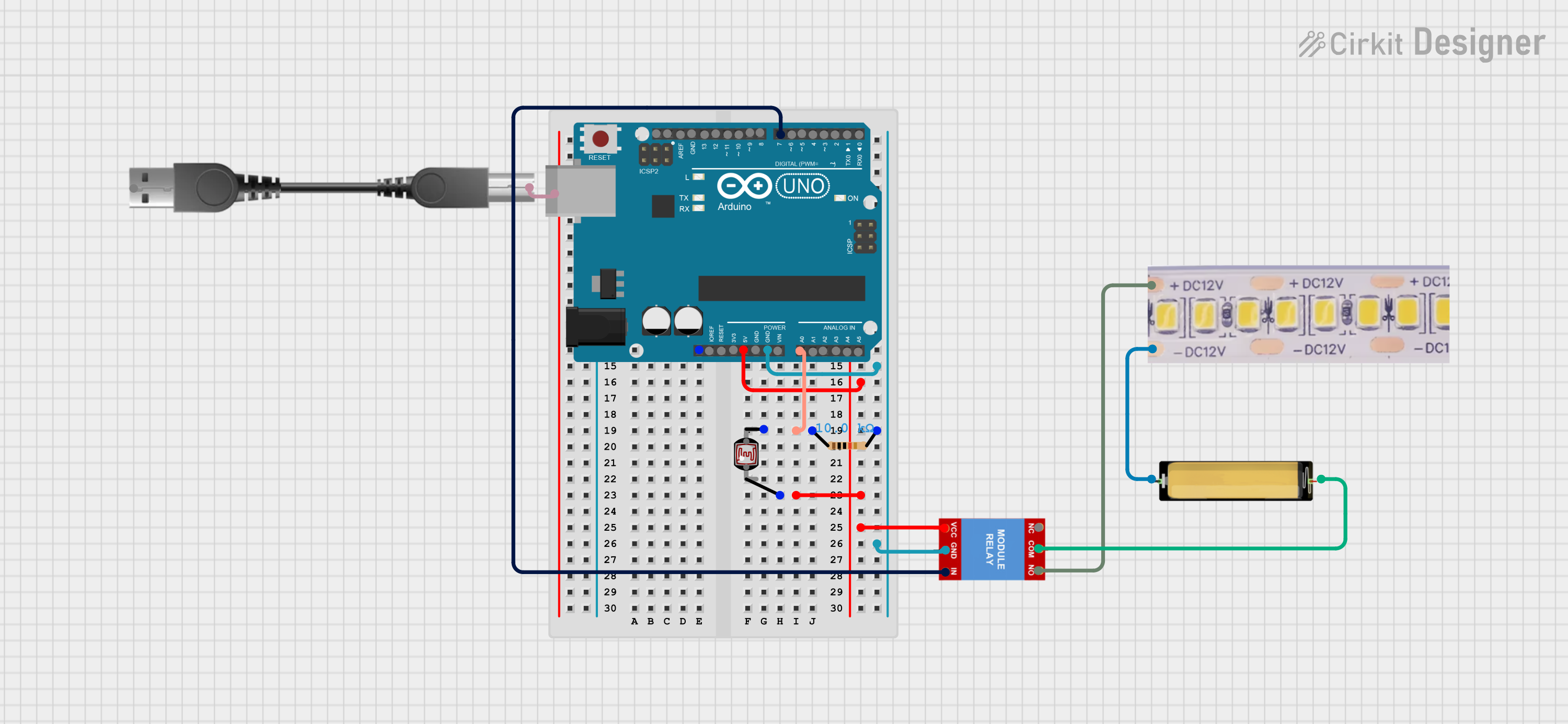
- Arduino reads analog data from LDR (connected to A0).
- This data is sent to CircuitVerse via the Web Serial API.
- Based on the reading, CircuitVerse sends a control bit (0 or 1) back to the Arduino — it sends 1 if the LDR reading is less than a threshold value (indicating low light).
- Arduino uses this bit to toggle Digital Pin 7 high or low.
- Digital Pin 7 controls the relay, which switches the bulb on/off.
This setup effectively demonstrates bi-directional communication (Tx & Rx) using the Serial Port component — making it a powerful example of real hardware-software integration in CircuitVerse.
Hardware Circuit used in Demo
While exploring desktop support, Initially, we anticipated that the Web Serial API might not work due to Tauri’s native environment. To ensure compatibility, we collaborated with contributor Harsh Rao and integrated the tauri-plugin-serialplugin, which provides native serial access in Tauri v2 applications.
🔍 Updated Insight We later discovered that the Web Serial API is also supported in the CircuitVerse desktop app, thanks to its use of Microsoft Edge WebView2. This means:
- ✅ No native plugin is required for standard serial communication in most cases.
- ✅ The SerialPort component works seamlessly across both web and desktop environments using the same Web Serial API.
Nevertheless, integrating the native plugin adds long-term value by enabling:
- Access to advanced serial features or ports with elevated permissions
- Potential support for alternative desktop environments
- Better control over performance and error handling in future iterations
FIFO Queue
The FIFO Queue circuit element simulates a hardware queue that follows the First-In-First-Out principle. It temporarily stores input data and allows retrieval in the same order it was received. Users can enqueue (ENQ) and dequeue (DEQ) data values, reset the entire queue (RST), and monitor its current state via EMP (Empty) and FULL indicators.
Check out the video demonstration below
We also prioritized documentation from the very beginning. Following the standard format used across CircuitVerse documentation—Description, Ports, Example, and Embedded Circuit—we authored complete docs for all the newly added components. A major focus of the project was to enable real hardware communication through the Web Serial API, allowing CircuitVerse to interact with UART-based devices like Arduino directly from the browser.
This collaborative and structured approach enabled us to meet the goals of project successfully.
List of Pull Requests
Components:
- #624 – Add Shift Register Component
- #622 – Add Comparator Component
- #623 – Add Pull Resistor Component
- #630 – Add Bit Extender Component
- #638 – Add Serial Port Component
- #634 – Add FIFO Queue Component
Documentation:
- #428 – Add documentation for Shift Register
- #429 – Add documentation for Comparator
- #430 – Add documentation for Pull Resistor
- #431 – Add documentation for Bit Extender
- #436 – Add documentation for Serial Port
- #434 – Add documentation for FIFO Queue
Conclusion
The GSoC has been a great learning experience. Despite encountering a few early challenges, I was able to successfully complete the core goals of the project—including the development of hardware-oriented components and real hardware communication via serial interfaces.
The continuous support from mentors, contributors, and the CircuitVerse community played a crucial role in making this possible, and I’m grateful for their guidance throughout.
Acknowledgements
I would like to express my sincere gratitude to the entire CircuitVerse team for their continuous support throughout the program.
Special thanks to my mentor Aman Asrani for his consistent guidance, code reviews, and thoughtful feedback at every stage of the project. I’m also grateful to Prof. Gargi Khanna for her crucial role in guiding us whenever we were stuck and for helping refine the design of several components and to Aboobacker MK, for giving me this opportuinity, his constant encouragement and for ensuring a smooth GSoC experience for all contributors.
I’d also like to thank Harsh Rao for his valuable insights on integrating desktop support, and all the contributors for fostering a collaborative and welcoming environment.
Lastly, I’m thankful to Google Summer of Code for providing this incredible opportunity to learn, contribute to open source, and grow as a developer.
Thank you for reading!