Desktop Application & Vue Frontend Updates: GSoC 2025 Phase 1 Report
This blog post covers my journey with Google Summer of Code 2022 at CircuitVerse till Mid Evaluation.
Project Description
CircuitVerse is dedicated to aid students to self learn digital-logic design.
My project is aimed to complete the Desktop Application for the simulator. This project also includes deploying release mechanisms, integrating vue-simulator to the primary codebase along with Typescipt and Vue migration.
Community Bonding Period
During the community bonding period, we prepared a detailed plan for the project and discussed the milestones to be achieved. My mentors and co-mentees were very supportive throughout this phase, helping me understand the codebase and guiding me in setting realistic goals. Their feedback and collaborative spirit made it easier to get started and stay on track with the project objectives.
Milestones Achieved
Of the major milestones to be achieved we have completed major parts for the phase 1. Once all of our current progress gets added we’d be able to add the artefacts to the online stores like Microsoft, Apple or Play store. We can also directly then move to integrating the vue-simulator to the primary codebase.
I. Authentication Model
The previous user authentication system did not work within the desktop application. Initially, we were redirecting users to the /users/sign_in URL for login. However, this redirection was blocked by Tauri due to its strict Cross-Origin Resource Sharing (CORS) policies. To resolve this issue, we redesigned the authentication flow to function entirely within the desktop environment.
We implemented a native login form inside the application that allowed users to enter their credentials directly. These credentials were then sent to the backend server for authentication without requiring any external browser-based redirects. This change significantly improved the user experience, as the entire login process remained within the desktop app.
Additionally, we ensured that session information was stored locally, allowing users to stay logged in even after restarting the application. The session persisted unless the user explicitly logged out, cleared their cache, or uninstalled the app.
A major issue we faced here was from the dashboard. The Dashboard needing to use the online links is not the way to go for the offline Desktop Application. So to counter this we are working on employing the Dashboard for the Tauri app with its own framework to be able to sync data with the cloud and each user can have his own local Dashboard synceup upto their system. We hope to achieve it very soon in the Phase 2.
Some output images
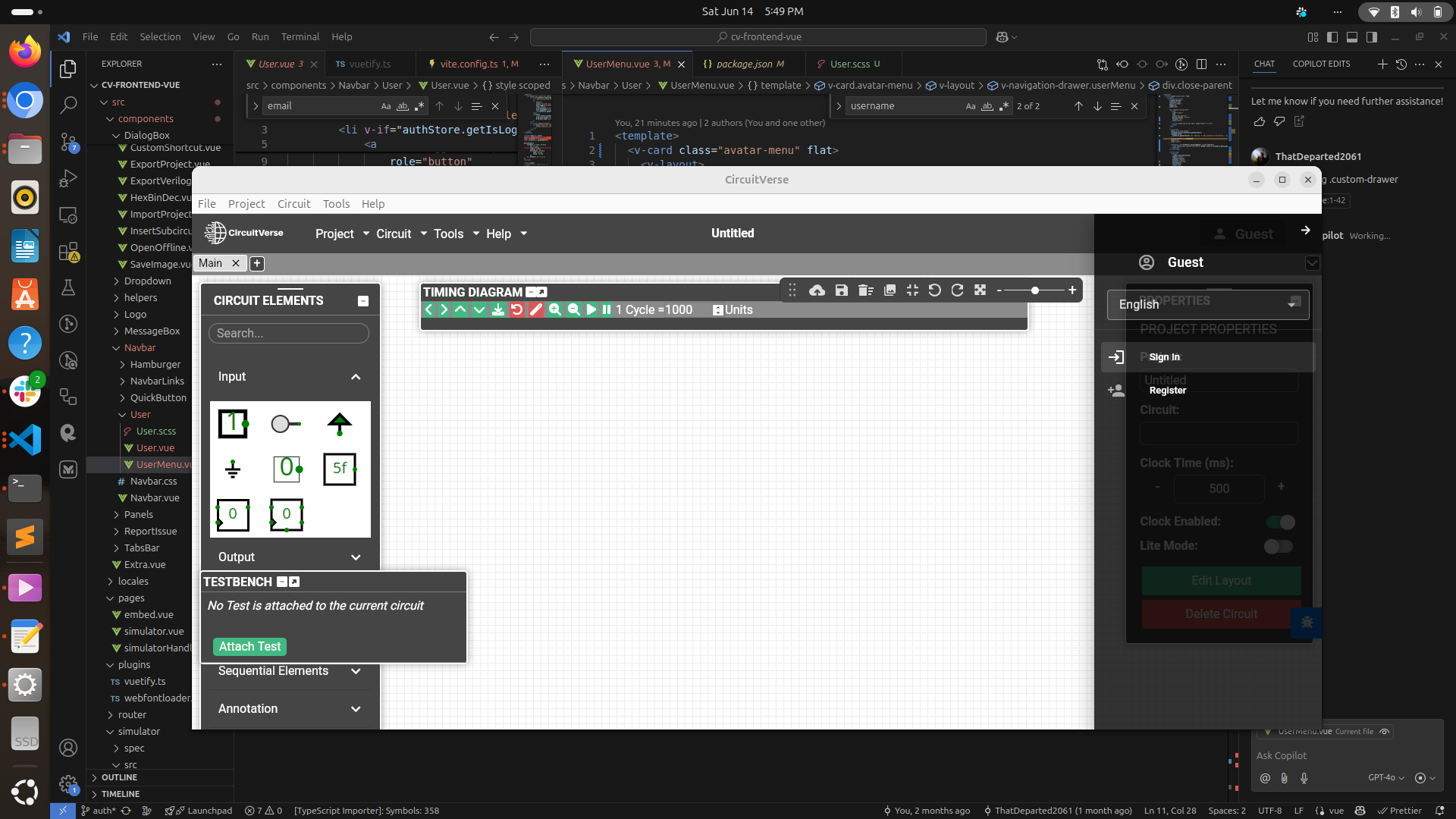
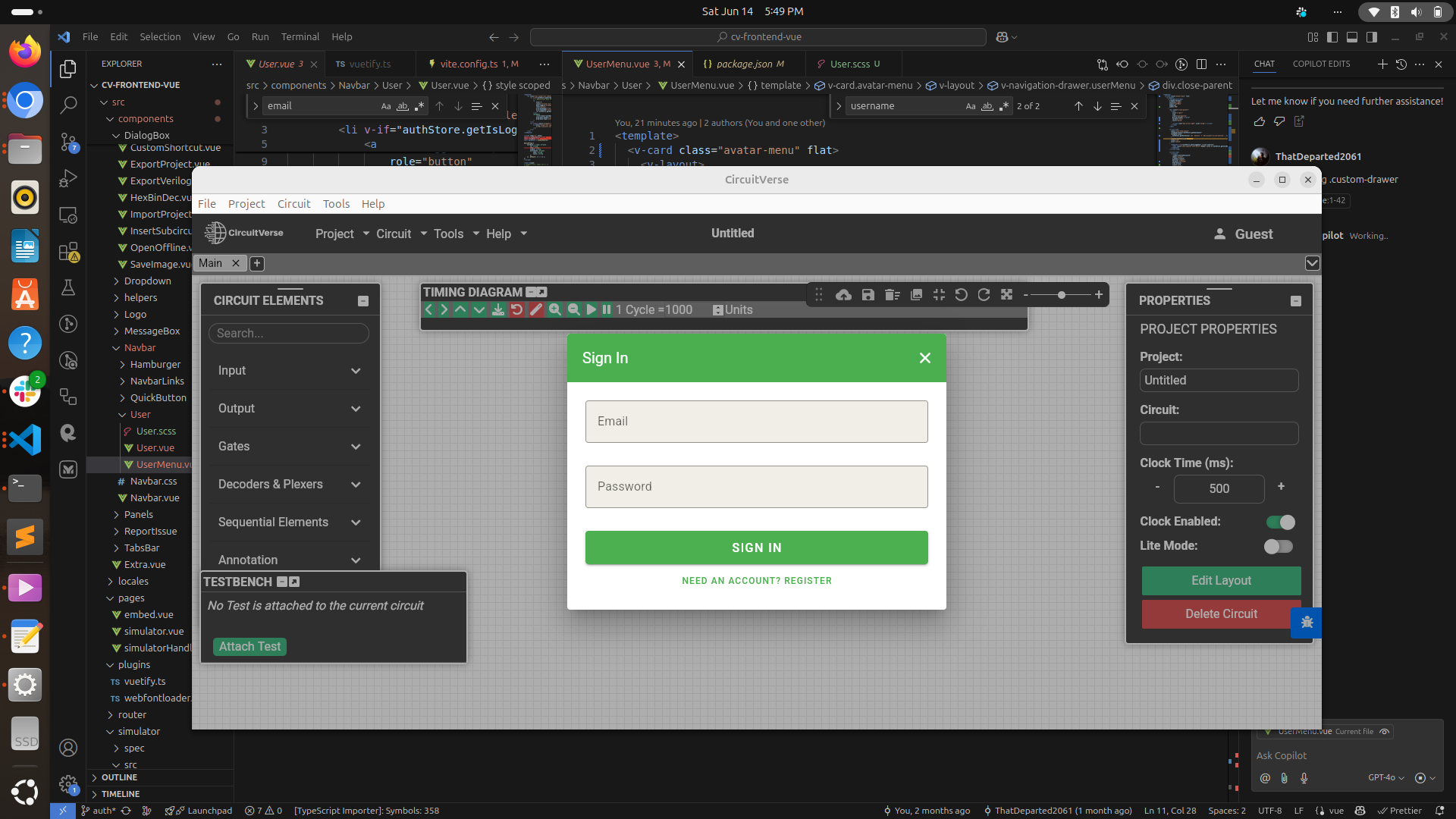
Related PR PR - 554
II. Versioning PR
This is the PR that holds the changes to sync the src folder to v0 and v1. This PR marked the official begining for the use of v0 as the primary subfolder. We are syncing all of src to v0 and v1. We will keep all of the legacy features to v0. The new features will be added to v1. So most of the project work that is being done by us under other projects which introduce new features shall be merged to v1.
We’d soon be removing the src folder and have only v0 and v1. We have also decided of enabling hot version reload, where in the users can dynamically change the version of the simulator they are using, i.e. v0 for the legacy features and v1 for the new ones.
Related PR PR - 599
III. Release Pipelines
We successfully implemented a robust, secure, and automated CI/CD pipeline for cross-platform desktop application distribution using Tauri’s tauri-build and tauri-distribute modules. This pipeline streamlined the release process by automatically triggering builds for Windows, macOS, and Linux upon every GitHub Release event. The resulting platform-specific artifacts—.msi for Windows, .AppImage for Linux, and .dmg for macOS—were automatically attached to the corresponding GitHub Release as downloadable assets. Each release was also accompanied by a changelog documenting enhancements and any breaking changes compared to the previous version.
To maintain version consistency, we extracted the application version directly from tauri.conf.json. Due to cross-compilation limitations in Tauri’s current experimental phase, we used native runners for each operating system, ensuring stable and reliable builds without compatibility issues. Although we have not yet completed the platform-specific code signing, the rest of the pipeline is fully functional and lays the groundwork for future compatibility with distribution platforms like the Microsoft Store and Mac App Store.
In addition, we focused on optimizing build size and performance. We introduced custom Cargo profiles to improve binary efficiency and enabled configuration options in tauri.conf.json—such as removing unused commands—to minimize unnecessary overhead. We plan to continue refining these optimizations by referencing resources like The Cargo Book and other Tauri performance best practices.
Final drafts Part 1
Part 2
Learning
- Gained hands-on experience with Tauri for building cross-platform desktop applications.
- Learned how to design and implement secure authentication flows within a desktop environment.
- Understood the importance of versioning and managing legacy vs. new features in a large codebase.
- Improved skills in setting up automated CI/CD pipelines for multi-platform releases.
- Enhanced knowledge of optimizing build size and performance for desktop apps.
- Collaborated effectively with mentors and co-mentees, improving communication and teamwork.
- Strengthened debugging and troubleshooting abilities while resolving platform-specific issues.
- Developed a deeper understanding of integrating Vue and Typescript into existing projects.
- Learned best practices for syncing local and cloud data in desktop applications.
- Improved documentation and changelog writing for release management.
Conclusion
Participating in GSoC has been a transformative experience, filled with both technical and personal growth. The challenges encountered throughout the project pushed me to learn new technologies and approaches, while the support from the community and mentors made the journey enjoyable and rewarding. I gained valuable insights into collaborative development, project management, and the importance of clear communication in open source.
Looking ahead, I am excited to continue contributing and building on the foundation laid during this phase. The skills and confidence gained will be invaluable for future work, and I am grateful for the opportunity to be part of such an inspiring community.
I would like to thank, Aboobacker MK, Vedant Jain,Aryann Dwevedi, Niladri Adhikary, Arnab Das for giving me chance for this incredible opportunity and guiding me throughout the project.